
Album or cover artwork can easily be embedded within MP3 files via ID3 tags. However, the ID3 specification caters for over 20 different image categories. So which is the best image category to choose, and is it ever worth embedding more than one image into your MP3 files?
Since the release of version 2 of the ID3 tag specification over ten years ago it’s been possible to add album artwork to your collection of MP3 files. This feature of the ID3 specification is now pretty well supported. Most MP3 players with a screen capable of displaying graphics (be they software or hardware based), now support this feature.
However, as usual with these sort of things, MP3 player manufacturers tend to implement the ID3 tag standard in subtly different ways. This inevitably leads to unpredictable results for the user, particularly when displaying album art.
Embedding Images into MP3s
If all this talk of ID3 tags leaves you a bit cold, then it may be worth pausing for a moment to read my previous post on ID3 tags in MP3 files before proceeding, as they are fundamental to our further discussions.
Embedding images into MP3 files is fairly straightforward and indeed might be accomplished automatically for you by your CD ripping software. If this is not the case, then you will need a special piece of software called a tag editor to help with the task. There are lots of tag editors available for a host of operating systems, with some good free ones available. My personal favourite is Mp3Tag.
If you want to know more about adding cover art to your MP3 files, the best image format to use and what image size you should consider using, then check out my previous post on embedding album art in MP3 files.
ID3 Artwork Options
The present ID3 standard (version 2.3.0) lists 21 different images that can be embedded within an MP3 file. In practice only one image is ever usually embedded, although an MP3 track could technically have 20 images (only one of the icons #2 or #3 can be embedded at a time). However, the space taken up by the images in such a file would become quite significant compared to the audio data.
The images available to choose from are:
- Other
- 32×32 pixel icon (PNG only)
- Other file icon
- Front Cover
- Rear Cover
- Leaflet page
- Media (e.g. label side of CD)
- Lead artist, Lead performer or Soloist
- Artist or Performer
- Conductor
- Band or Orchestra
- Composer
- Lyricist or Text writer
- Recording Location
- During Recording
- During Performance
- Movie or Video screen capture
- A Bright coloured fish
- Illustration
- Band or Artist Logo
- Publisher or Studio Logo
There are two notable exceptions in the above list that are a little different from the others:
- The second option (#2) only allows images in the PNG format and images which are sized 32 by 32 pixels for use as a small icon.
- The eighteenth option (#18) in the list; a bright coloured fish! Some loony tune obviously decided that this was a good idea for a formal specification. Need I say more?
So, for all essential practical purposes, the list really has 20 options (ignoring the brightly coloured fish), or if you are just considering images of unrestricted size, then it has 19 options.
Support for ID3 Images
MP3 Players
Not all MP3 players are created equal when it comes to displaying ID3 images. For example, the Creative Zen Vision: M, while having a large colour screen capable of displaying pictures, does not seem to display any of the ID3 images as far as I can tell; no matter which image tag is used.
The basic Creative Zen displays the ID3 image from the last track in a folder, but insists on using this same image for all tracks in the folder, no matter whether they have different artwork embedded within them or not.
Software Players
Windows media player seems to display any ID3 image correctly, but providing there’s only one image in a track. If a track contains more than one image, it will default to the Front Cover image. Quite how you’re supposed to see the other images, I really don’t know, but at least this seems a sensible fall back position.
Podcasts
A lot of podcasts seem to use the Other image tag (#1 from the above list) for their artwork instead of the Front Cover option. I’m not really sure why this is, other than that their software defaults to this option. My preference would be for the Front Cover tag in this circumstance, but I’d be interested to see what the general consensus is on this.
Test your Player
Having tried a few players and found them to be wanting in their handling of ID3 images, I decided to do a structured test on those I had available to me.
Test Images
In order to test the various ID3 image tags on a range of players, I produced 21 different images corresponding to each of the image tags. Each image is a 300 x 300 pixel jpeg (except the 32 x 32 pixel PNG icon):
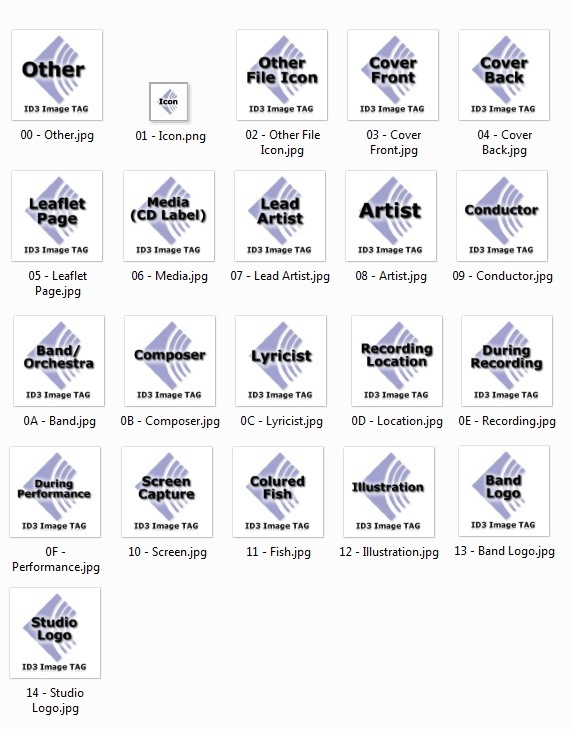
If you’d like to use these images yourself for your own experiments, you can download all 21 as a zip file. Each individual image is approximately 25kB in size:
- ID3-Images.zip (246kB)
Test MP3 Tracks
In order to test these images on an MP3 player, they each needed to be embedded into an MP3 file with the appropriate ID3 image tag associated with the image.
My tag editing software doesn’t support the 32×32 icon image tag or the nonsensical fish tag, so I ended up creating 20 separate MP3 files: the 19 basic image tags plus one MP3 containing all 19 images in the one track.
The MP3 track including the 19 separate images in the one file ended up with a resultant file size of 911kB for a 26 second 128kbps MP3!
- 21 – ID3 Image – All Images.mp3 (911kB)
If you’d like to use these MP3 files for yourself to test your own MP3 player’s performance in this respect, you can download all 20 as a zip file:
- ID3-Image-Test-MP3s.zip (2.5MB)
Report Back
If you’ve found these files useful and end up discovering some quirks with your particular player, please leave a comment so that others can benefit from your findings. You never know, it may spur a manufacturer into updating their firmware to fix the problems and make their players fully compliant for future users.

Hi. All work fine on rhytmbox ( surely you already knew) . I was looking to know the less_size to use in images to produce the better_quality to reproduce in my ipod. Your post was very useful. Thank you
Thanks Sergio, I’m pleased you found the article useful.
Hi there,
Is there any way to add a single image for all my mp3 files. I mean the bulk operation i.e to add the same image for all my mp3 at once.
Please reply and thanks in advance.
Hi Muhammad, If you use a tag editor like MP3TAG you should be able to select all of the MP3 files you want, drag your artwork in and save to all the selected files in one operation.
Hi Richard, although its more than 4 years old i see you active. Could you share how you embedded 19 images in one track?
Hi, You’ll need to use a tagging tool like Mp3tag to embed the album art for each of the individual artwork tag types. For Mp3tag you can right click on the cover art box and “Add cover…” then “Set cover type” and repeat the process for as many cover types as you want. Hope this helps.
Hi,
According to iTunes, the standard cover art needs to be 1400×1400 (max 3kx3k), while the rss-standard says something else.
Does the 1400×1400 also applies to episode cover art and not just the whole stream?
What size should the embedded image be?
And should I use Apple’s standard for normal RSS-images as well?
Gos
Hi Gos,
A good question and yes the itunes:image referenced in your RSS feed needs to be a minimum of 1400 x 1400px and is the artwork for the whole feed in iTunes only. However I wouldn’t go that big for each episode, I would tend to go for 600 x 600 px.
I hope this helps.
Regards, Richard
Thanks for your help! Still a bit unclear though, thanks to my unclear questions.
If we section it like I’ve done here – are the file sizes correct?
Cover art – show – itunes-rss: min 1400×1400
Cover art – show – rss: min 1400×1400
Cover art – episode – itunes-rss: 1400×1400
Cover art – episode – rss: 600×600
Cover art – embedded in media file: 600×600
–Gos
It sounds good to me. The critical thing is to have the show art at 1400×1400. Perhaps you could make the itunes-rss: 600×600 for consistency then all the episode artwork matches.
Some podcasters do use 1400×1400 for the embedded artwork and episode artwork, others 600×600 and some even 300×300 (but I wouldn’t advocate going that low), so it’s a bit of personal taste I think.
Just tested Groove Music on Windows 10 Mobile. For album art it picks the first mp3 file in the album and uses whatever art is in that file for the whole album. It must store the image in its own database. All attempts to include “artist art” in tags to force Groove Music to show my own image in the artists list failed. The only way to get Groove Music to show “artist art” in the artists list is to let it find the images on the net, and it does a very poor job, including using images of artist lookalikes quite a lot of the time!
It’s a pain isn’t it. There doesn’t seem to be consistent support in media players for all of the ID3 tags.
I am having a hard time getting id3 tags to display album art in my Chevrolet Tahoe mylink radio. I have done lots of googling but can not find a solution. Now I’m wondering if maybe I need to set a different file type for the tag in mp3tag, such as other instead of front cover. Do you have any experience with car systems? This is music played from a USB. M4A files display the MP4 tag album art perfectly.
Hi Mary, You might well need to use a different tag for the picture, download the “21 – ID3 Image – All Images.mp3” file above onto your USB stick, put it into your radio and see which tag displays, hopefully that should help you.
Richard,
Thanks for the reply. I literally figured it out like a minute after I posted. When you add the art in iTunes it puts it in the other field of the id3 tag instead of front cover. I used mp3tag software to change what was there to front cover and it worked perfect. Your article helped me to understand. Thanks!
No problem, you’re most welcome. I’m glad you’ve managed to fix your problem and pleased my article helped you too.
I use MP3Tag software but I have not found the field name that tags the art. What us it called?
I also wouldn’t know the format of the code to show the artwork or its location or how to determine if the tag contains one ore more art.
If you drag artwork into the cover art box it defaults to “Front Cover” on V3.20 of Mp3tag. If you drag additional images into the same box and select the image number using the left and right buttons under the image and then go to Edit > Cover > Set cover type, you can change the second image to a different cover art type. In this way you can have lots of different images for front cover, back cover etc.. Hope this helps.