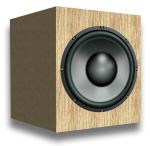
 Any system is only as good as the weakest link in the chain and audio systems are certainly no exception to the rule. Assuming that your music system is producing reasonably pleasant sounds, you may never stop to give it a second thought, but with a few simple tests you can check to make sure that your speakers are wired correctly and that you’re getting the best out of your system.
Attaching speakers to your Hi-Fi system usually only requires a few cables. You wouldn’t think that getting these cables mixed up would present much of a problem would you, providing your music plays back OK and no smoke comes out of the system?
Well, under most circumstances you’d be right, with a simple channel mix up being the most likely probable outcome, but if you have a real knack for getting things back to front, then you could have your speakers wired out-of-phase, which while it won’t do any damage, certainly won’t help you to get the best out of your system.
These potential problems are easy to spot with a few simple tests and luckily the corresponding remedies are equally simple.
Left and Right Tests
In the grand scale of things, getting your left and right speakers mixed up is not a major problem. If your left and right speakers are mixed up, your music will still come out in wonderful stereo (providing of course that you’re listening to a stereo track) it’s just that what should be coming out of the left-hand speaker is actually coming out of the right-hand speaker and vice versa.
Record producers and mix engineers spend weeks mixing and producing an album and as part of the process they will decide where in the mix to place certain instruments. So if you have a favourite track that has an instrument panned (music speak for stereo positioning of sounds) to one side, wouldn’t you prefer to listen to it as the artist intended rather than topsy turvey?
You would? Good.
Then try the following two fairly self explanatory tests on your music system. Listening to the left speaker test, you should hear Winnie’s voice coming out of the left hand speaker (or headphone) only and vice versa for the right speaker test.
Left Speaker Test:
[powerpress url=”https://www.richardfarrar.com/audio/left.mp3″]
Or, download: left.mp3 [0’ 04”, 68kB]
Right Speaker Test:
[powerpress url=”https://www.richardfarrar.com/audio/right.mp3″]
Or, download: right.mp3 [0’ 04”, 80kB]
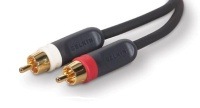 If things don’t go according to plan, then you have either got your speakers wires mixed up (or headphones on the wrong way round), or the audio cabling (shown right) from your playback device to the amplifier crossed over.
Normally audio signal cables (as opposed to speaker cables) are colour coded with the red plug going to the red socket and white to white at each end of the cable.
You will need to check the wiring of your system, rewiring where necessary and then repeat the two tests to make sure that both channels are working and in the correct order.
The following diagram shows how to wire your speakers to your amplifier: 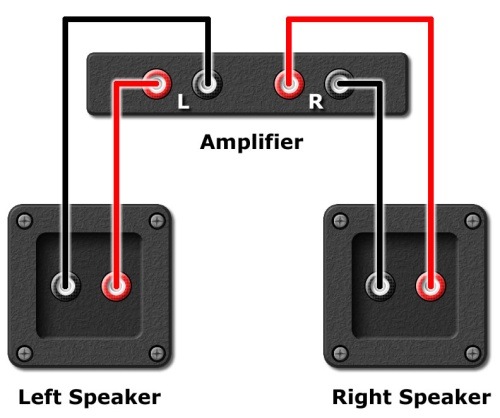
Balance Test
Now that you’re happy that you have your left and rights sorted out, the next thing to check is your speaker balance.
When you listen to the following test, place your head as centrally as you can between your two speakers; you should hear Winnie coming from the dead centre of your speakers. In this case you are hearing equal amounts of Winnie from both speakers.
Centre Balance Test:
[powerpress url=”https://www.richardfarrar.com/audio/centre.mp3″]
Or, download: centre.mp3 [0’ 04”, 67kB]
If Winnie sounds to be coming either to the left or right of the centre position, you may need to check to see if your amplifier or system has a balance control. If it does, ensure that the balance control is in the centre position.
If after checking the balance control, things still sounds one sided, you may have a more fundamental problem with your system that requires investigation or professional attention. This could be as simple as a dirty connection or a dodgy interconnecting cable, or if things are worse it could be a more ingrained electronic or speaker problem.
Alternatively, if you can’t pin point the sound as definitely coming from the centre, you may have a phasing problem…
Speaker Phase Test
A phasing problem with speakers is very simple to fix, but can significantly degrade your system’s sonic performance.
Trying to describe how out of phase speakers sound is a little difficult unless you’ve experienced it first hand. You’re likely to hear significantly less bass and instead of producing a strong centre image, the sound appears to stay within the speakers, making things sound rather disconnected.
Listen to the following and you should be able to hear the difference for yourself:
Speaker Phase Test:
[powerpress url=”https://www.richardfarrar.com/audio/out-of-phase.mp3″]
Or, download: out-of-phase.mp3 [0’ 07”, 128kB]
If the above test sounds perfectly fine, but the previous centre channel test sounded really odd, then your speakers are out of phase.
Fixing the Problem
Thankfully, while the effect can be quite strange, the fix is really simple.
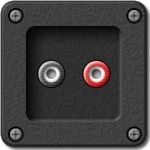 Pick a speaker, but not both, this must only be done on one speaker. Now swap the two wires on the back of the speaker around. Usually the speaker will have two connections; one black (the negative or – connector) and one red (positive or + connector).
That should be it, job done. Now listen to the centre/balance test and phase test again to confirm that you have everything working hunky dory.
Sit Back and Relax
Now that you have your speakers wired up correctly with your lefts and rights where they should be and no strange out of phase effects, you can lie back, put your feet up and listen to your favourite music in the knowledge of a job well done.

Hi
The above is the best article I’ve seen yet on common speaker problems. Your article is both funny and relevent. Thank you.
Bill Grandy
Windsor
Nova Scotia
Canada
WOW, is it just me or is every article on the internet on out of phase speakers out of phase itself?
For wiring speakers up correctly, you do the following (no batteries needed to check for pushing or popping, no swapping the wires, none of that crap):
Hook up a small piece of speaker wire to any of the speaker ports on the reciever/amp(front, rear channel whatever).
Now set your DVM to measure DC (we get the DC equivalent reading of the AC and subsequent polarity or phase).
Now, put the red lead from DVM to the wire thats connected to the red lead port, and do the same for the black lead of the DVM and place it on the wire connected to the black port of your reciever. Now you will get a reading, the numerical part of it you can ignore, what you want is + or – part of it. If its – , that means the rest of your speakers should be connected this exact way. It will show + if you reverse it which means you placed the black lead on the wire connected to red and red lead to wire connected to black, that means you shouldn’t connect the rest of your speakers that way.
So just to clarify if you are still confused:
(this is for your short testing wire you hooked up) If the reading you got while placing red lead to RED port wire and placing black lead to BLACK port wire is a – (negative symbol), then you know how the rest should look like when you place the DVM on the other wires.
That is, if you have a speaker wire coming out from some place in the wall or ceiling, and want to know how your speaker should be hooked up (which wire goes where), place your RED lead of your DVM to one of the wires, and BLACK lead to the remaining wire, if it gives you – (neg) symbol that means the RED lead wire will go to the RED speaker port, so now you know.
Just to add, I’m no expert, but this seems like simple logic to me, so don’t take my “expert” word for it if you know what I mean.
I have a 2012 bmw 528i I have one kicker 12 inch sub at 1 ohm ran to a pioneer 800 at 1 ohm stable I have to use a line converter for my rca jacks to my amp. I need to know to hook up the converter correctly because I’m getting no bass while running 800 watts to a 12 inch sub at 1 ohm can someone please comment back I really need the hep thanks
If By receiver you mean amp, and by read DC you mean DC10A, and connect vom red lead to positive + and black lead to negative – . The why when I do that my vom reads positive for left channel and negative for right channel.? and apon connecting vom to jct plug for all speakers testing each one the all read negative – .? Does that mean there is an issue with my amp that seems to be working fine, or when I installed new speakers did I hook them out of phase not realizing I might be doing that…?
“David” (and anyone else);
PLEASE don’t connect ANY ammeter, 10A or otherwise, to ANY amp outputs!
That is a direct short, and can damage your amp, and probably your meter too.
(Always use volts when measuring a signal or power source! Amps are only for connecting in series [in one side] to measure current flow; never ‘across’ the source).
Won’t work if they are wired in series/parallel
Jezz, that is some great info. Thank you so much. And this article is so helpful I agree there to.
I am such a speaker bum. I have Bluetooth running my hard wiring going in and out all over my house and yard. I am always fiddling with it. Most I have to fiddle because something is falling down or not piping through right. It is very rewarding but it takes hours and days at getting it maybe right. I have an itch for vacuums also. Strange but true. I use only shop vac as vacuums due to the power. True story, I even had a hand push airport runway vacuum I used in a home years back. Don’t know what happened to it. Oh well different article huh.
Have a great musical day.
“tooky”; OMG, PLEASE refrain from posting if you don’t fully understand basic electronics.
I appreciate your time to try and help others, but your advice is totally wrong.
I have never replied so harshly, but your instructions are so erroneous that I don’t know where to start.
I am a professional electronic technician and have done this all my life.
First off, phasing is the property of the AC audio signal fed to the speakers.
(You CAN’T measure this on a DC setting).
You want all your speakers (on anything with more than one speaker) to work together, and not oppose each other.
This means they all ‘push’ and ‘pull’ at same time.
An audio signal on a scope looks like a mix of sine waves (like water waves), it is important that the ‘crests’ and ‘troughs’ are not reversed.
If the speaker are wired wrong, the signal will go through the speaker coil opposite than the other speakers, and the cone moves in the opposite direction (than the other speakers).
DC measurement at the amp output will ONLY tell you DC offset of the amp (Ideally zero), not the (AC) phase of the content.
It is near zero, (but never perfectly 0, except in transformer output or capacitor output amps).
It varies randomly with the amps calibration, quality, and has nothing to do with the audio signal.
It can be + or -, can drift, or change from day to day, or channel to channel.
You can use the AC volts range, or your ears (or a battery), to measure phasing, thusly:
You need a reasonable stereo sound source without drastic left or right content or preferably mono (or mono switch or FM mono).
Your amp and speakers should be marked, and hopefully your speaker wires have polarity markings.
Where to measure will depend on what part you want to check for correct phasing.
To check at the amp, measure the AC volts (with music or test source playing) between the red/+ and gnd/- of any channel. (probe polarity is irrelevant)
This measurement is not necessary, but will help you understand, and let you know if your meter is registering the audio adequately.
[If you don’t get a reading, raise your volume to a moderate level, and/or lower the AC range setting].
Now measure between any two channels on the red/+ terminals*. (again probe polarity is irrelevant).
If your terminals are connected:
“In Phase” content will read roughly zero (all you will be seeing is any differential stereo content, another words, you see (instantaneous) sound that only is coming out of one or the other speaker only; ie ‘stereo content’. [This is what you want].
“Out Of Phase” content will read roughly double what you read in the first reading. [Generally, you will not encounter this condition/reading].
This will also happen if your amp is in ‘bridged mode’ setting [or a Rock-Ola jukebox amp]. (details beyond the scope of this reply).
[If you reading is double, look for an incorrectly set ‘bridge’ switch somewhere (or software setting), or bridge jumpers in the back of the amp].
If your amp is identified ok, and you are checking your speaker feed wiring, you would need to do this AT THE SPEAKER END of those wires, and may require using some wire to extend your meter leads (like a spare length of speaker wire?).
Usually, it is easier to use a continuity tester or ohm meter, to sort out your speaker wiring (again, you may need to extend your meter lead).
Or, read tips about various wire polarity marking/identification methods (most types of twin-lead wire/cable have some sort of markings – some very subtle).
If you are checking the speakers themselves, and your speakers aren’t marked, then you will need to use the battery method or other methods to determine the polarity.
If they are the same brand, you can connect them all identically, and then their phase will match “each other”, but this won’t work if you have other speakers involved as you have a 50/50 chance that it matches “them” correctly.
*Generally, you will measure exactly 0 volts between any two channels’ gnd/- terminals, as these are usually (but not always) un-driven, grounded pole.
[Included this in case you have trouble identifying your amps red/+ terminals, in case your markings are gone].
I read that thing about measuring DC on the speaker output points three times trying to make sense of it and it didnt make any.
If its a car stereo, make a note of how the originals were wired or find a wiring diagram on line. Unfortunately some aftermarket speaker manufacturers like Pioneer don’t always mark the red pin. This makes it more challenging to change one pair of speakers in a 4 speaker setup.
Ignore the DC thing completely, it won’t work or be any help.
Are there any other markings on the speakers that might help to indicate the + and-? May feint indendations of a plus or minus?
Otherwise, try putting my test files onto an MP3 player and plug it into your stereo if you can then do the listening tests to see if you can tell a difference and swap one speaker’s wires if it sounds odd. Just try listening on one pair of speakers at a time if you can.
Hope this helps.
Thanks, for this quick check with a meter for +/-.. Why does the red on red (pos) show – (neg) on the meter.?
Also checking the wire from speaker that normally goes into amp, sometimes gives me a negative (-) reading when crossing the wires Ie. black meter wire to pos gold wire to speaker. I think I just figured it out, these speakers have a built in crossover, as they are coax speakers. Would that be why? Thanks for your help.
Hi Morris, Take a look at @troubleshooter’s comments below about the problem with trying to use a multimeter to measure phase. As he describes, the multimeter won’t give you any useful information about the phasing and wiring polarity. You either need to trace the wires carefully, or try my little method to make sure your speakers are in phase with each other.
Hmm…looks like I could have complicated it more than I should have.
Here is an ASCII diagram for your test wire:
RED port ——— wire A ——- red lead —————
AMP/RECIEVER DVM reading
BLACK port ——— wire B ——- black lead ———
If DVM reading equals – (neg) then if you measure another “unkown” wire and get -(neg) reading, you know the correct configuration for the speaker.
Now for the unkown wire, place leads on wires until you get this same -(neg) reading, you now know that the red lead corresponds to the wire for the RED port on the reciever, etc…
Thank you ‘tooky’ for your effort, but your information is totally wrong (sorry).
Appreciate your effort…
DC measurements have nothing to do with signal phase.
It will only show you the amps DC offset calibration. (and varies randomly in polarity, depending on how close to ideal zero it is).
It also (and DC also) has nothing to do with the red and black on speaker wires; The speaker red/+ and gnd/- markings are meant for AC polarity (signal Phase ‘polarity’), and not DC polarity.
[It is kind of a misuse of the term ‘polarity’, strictly speaking, and adds some understandable confusion].
Phase is an AC signal property.
Please see my post above.
I know these are old threads, but they come up in current Google search, and I don’t want someone to mess up their system by using the wrong advice.
Just wanted to say thanks, my speakers were apparently reversed for the longest time with the balance way off lol
You’re welcome; glad it helped you to improve your system.
Hi pliz assist I’m trying to fix my speaker Behringer when I switch it on it doesn’t switch on it just indicate, what could be wrong?
Hi David, To be of any assistance I’d probably require a bit more information about the problem and your set-up. What is the model number for example? Cheers, Richard
Thank you for this article. I stumbled across it when I was reading about Joint Stereo (also a very good article by the way). The audio examples of out-of- & in-phase were so helpful. Apparently, I’ve been fussy/lucky enough when setting up my equipment that I managed to get the speakers in-phase. But I’ve always wondered what out of phase speakers would sound like and now I don’t have to muck around with my wiring … I can simply bookmark your page. Thanks!
Thanks Jason, it’s always nice to know that people find them useful. Thanks for taking the time to leave your comment.
And after all the years, these sound samples are still helping out a stranger. Thanks! ??
Thanks Olli.
Thanks for an informative article. “Phase” is a concept that a lot of folks find hard to grasp. With speaker systems, basically you want the cones of each speaker to be moving in the same direction at the same time. If they’re wired backwards, one speaker cone is moving in the exact opposite direction of the other at any given moment. Instead of reinforcing each other, they tend to cancel each other out.
Where is gets even more complicated is when you’re dealing with balanced audio inputs, as with pro sound and broadcast. Instead of one signal wire and one ground, balanced audio lines have two signal wires, + and a -, plus ground. This is good in that since both signals are referenced to ground but in opposite (instantaneous) polarity, any noise or interference induced into the cable externally gets canceled out. Balanced signals are generally higher in amplitude which also decreases the noise level (or more correctly, increases the signal-to-noise ratio. The down side is you have to be very careful to keep the phase aligned all through the signal processing chain, including limiters, amps, etc. Often the only way to do it properly is to put a scope on the final audio outputs, and of course the speaker phase affects the final sound as well. Ironically, it is possible to mis-wire a system so that if the phase is flipped an even number of times throughout the chain, it winds up being back in phase again at the output … a rare case of two wrongs making a right!
In this case two wrongs can indeed make a right, you just need to track the number of wrongs you’re making 🙂
Thank you: A swift, helpful, and effective set of tests.
Thank you! This exactly what I was looking for.
Further to mine of 2nd June, thank you again! Not just a test: a diagnostic tool. !My Windows recently died, and I had never properly configured my Linux alternative. Struggling to get radio-casts working on it, your wonderful article gave me the vital clue: Flash blocked.
I can’t seem to tell the difference between in phase and out of phase. I tried to switch the wires on the right speaker but there was still no difference between the woman’s voice samples. I did seem to notice less bass when playing music after swapping the wires.
Anyone got a suggestion to my problem? 🙂
If you’re noticing less bass, then I would say that is the out of out of phase of the two options. When you play the out of phase test, try to position your head centrally between the two speakers as this is where the effect will be most apparent.
To Younes, re phasing:
You might like to try what I did. I put the two speakers not in the usual stereo listening position, but side-by-side as close as possible, so that the two sound-waves might be in the best position to mutually reinforce or cancel. Sure enough, in-phase sounds solid and in-front of the speakers, whereas out-of phase sounds a little hollow and BEHIND the speakers. Good luck, M.
This was handy for setting up after takin the stereo to bits, nice one.
I’ve been working on a movie and have been using panning a lot, then I thought, ‘oh shoot, what if my speakers have been on the wrong sides the whole time?’ Luckily they were fine, but this article saved me! Now I won’t be afraid it’ll sound weird on the big screen!
Thanks, I’m glad you found it useful.
hi, i’ve recently hooked up a pair in car. im using the stock wires from the car but unfortunately there are no markings on the stock wires that indicate which is the positive or negative wire. the bass doesent sound all that great from the speakers which made me think they may be out of phase. i do have a dvm. i was just wondering if it could be used to locate the negative and postive wires. if so, how would i do it?
If you have a DVM, you can check the continuity of the cables from one end of the cable to the other to make sure you have them wired correctly and not swapped over.
I regret that ‘tooky’s well intended advice is incorrect;
It will not measure phase, but only DC offset, something not associated in any way with the signal phase.
Please refer to my post above commenting on ‘tooky’s post; or follow other methods of testing speaker phase.
Stock wires usually have ‘some’ sort of markings, sometimes a tracer color, sometimes conductors are silver or copper, sometimes printing on the wire (may only be spaced out every so far); OR, commonly, a faint ‘rib’ on the one edge of the extruded insulation.
Sometimes this is a single ‘rib’ on one of the wires, that you may mistake to a defect in the covering, or sometimes a set of ribs on (just) one of the wires. Look for these!
Have a look around your house for examples of all the different ways of marking conductors, on extension cords or appliances, etc.
Hi Richard,
A few days ago I purchased some Logitech Z4 computer speakers. Because it is a discontinued model (I think replaced by Z523) I was able to haggle and buy the display unit they had at the store for $70. When I got home and connected them up and played a song off youtube – I was extremely happy with my purchase and had a smile from ear to ear. But after about 10 seconds the right speaker stopped working. I thought I must have blown the speaker as I did crank it quite a bit. I checked the speaker connection at the back of the sub-woofer which was fine. I then swapped the left speaker connection with the right which then caused the right speaker to work but then the left didn’t work. This test obviously told me that there is nothing wrong with the speakers but the problem is with the female right speaker port at the back of the sub-woofer. If I fiddle, bend and twist the connection at the back of the woofer – I can sometimes get a hint of it working for a second or so. but cannot get a stable connection. I thought about buying another Logitech sub-woofer but I have found out that they do not sell spare parts – only the whole package.
Any hints on fixing this loose dodgy connection?
When I was a kid 30 years ago, I recall a similar problem with our stereo and my Dad wrapped some aluminium foil around male connection before plugging it back in which fixed the problem. I am loathe to try such an old fashioned thing on the sensitive modern equipment of today (unless you think is worth a try?).
Any help appreciated.
cheers
Rod Dufficy
Sydney, Australia
Hi Rod,
A difficult one. Have you tried some WD40 on the jack socket and then pushing it in and out quickly 4 or 5 times? If there’s any dirt or grunge on the connection, this may help to dislodge it and make a better electrical connection.
Great article, I have another scenario I’d like help with. In a car audio system with four speakers can there be phasing problems if the front speakers are phased together the same but opposite of the rear speaker phasing? I’m thinking yes, I recently upgraded the front speakers of my truck with much higher quality than the stock units but the sound is muddy and distant now across the truck. I live in New England and the speakers were installed on a rare 55° day last week. Now we’re back in the 20°-30° range so I don’t want to experiment with this theory unless it may yeild results. Thanks Mark.
Absolutely, if your rear speakers are out of phase they will definitely adversely affect the sound quality and your listening pleasure, particularly in such an enclosed space.
OK, thanks for the reply, so as I understand this, the back speakers being out of phase with the front speakers is most likely my problem. I’ll brave the cold and make the change…..Thanks.
That’s not to say that there aren’t any other issues, but it’s a good starting point and a likely candidate. Wrap up warm and let me know how you get on.
Success! I switched the phase of the new speakers and the results were amazing. Thanks for the insight. Take care.
Brilliant. So pleased it was successful for you, and such a simple thing really, which can have such a massive effect on the sound.
Richard, I had to shift my office furniture around to fix an ADSL connection problem. That worked but when I hooked the kit back up my sound system was all messed up. Fortunately I remembered your article and the built in sound tests and Bob’s Your Uncle. Fixed!!! It was a very handy reference article and worth bookmarking for the nex time! You know me, I will be doing it again!
Glad to hear it solved your problem so quickly.
Hey my music system(Inspire M2600) is not working. i don,t know where is the wrong.When i play a video or music no sound is heard.I have teaated wiring.Plz. help… thanks in advance.
Hi, don’t really know what to suggest without seeing the system. Have you got any friends that could take a look at it for you? It has got power to it I assume?
Hi Richard,
Many thanks for your cool explanation, now i have a better understanding on phasing.
My system has got a phasing like problem, where my after listening to 15 minutes of music in my car, it feels like there is a finger poking on the back of left neck, its really disturbing.
Now, i just purchased some polarity check instrument, and have tested it against all speaker, and they are all set properly, which means no polarity problem.
However my system sounds exactly like phasing problem. I switched my left speaker to the right and right to the left, the problem moved to the right. So i brought it back to the sound installer and they change the new amp for me.. The bad news is, the problem remains. The guy said its the HU, so i purchased another brand new Alpine head unit, still it did not go away. I hv spent too much money on this system, and too much days with this. Its been a stressful 23 days since i change my car sound system. Please let me know what the problem is.
Thanks in advance sir
Hi Jimmy, How many speakers do you have in your car, 2, 4? If I put up the phase test as a downloadable MP3 on my website, would that help you to try in your car? If it is truly out of phase then the out of phase MP3 would actually sound in phase!
I have 2 way focal speakers from focal just for the front speakers, for the rear speaker i used the default speaker. I thought something cancels out between front and back speaker. So i turn the fader all the way to the front. Out of phase and in phase mp3 will actually help out a lot. However i went to the installer and he confirms it is not problem with phasing.
Hi Jimmy, I’ve amended the post and added a link to the speaker phase test mp3 so that you can try it in your car. Good luck.
Nice. I just bought a new hp laptop and hate the speakers….. with your test I think the left speaker is out of phase…. the right sounds deeper and fuller, the left hollow and thin.
on right speaker she sounds full, on left speaker she sounds tinny.
when I play your “phase test” the right is louder “in phase” the left tinny and louder “out of phase” did I come to the right conclusion?
how will they fix it ??
Hi, If your system is out of phase, both speakers should sound different, not just one, although if when the phase test swaps, so does the loudest speaker, it could potentially be a phasing problem. To fix it, a repair shop would need to swap the speaker wires over on just one speaker (assuming it is just a phase issue). However, if it’s brand new and the speakers aren’t working satisfactorily, then the manufacturer should fix it for you under warranty.
Thank you for your very clear explanation ! I successfully solved my “phasing sound” issue ! 🙂
Pleased to be of assistance. 🙂
Hello, how did you solve the problem, can you help me I have same issue 🙁
Hi Richard
could you advise me please – have just bought a music centre at a car boot. Its speakers were not attached. How do I tell which is right and which is left? I do not want to try attaching them to my computer, only to their own music centre.
Also, if I attach them wrong, does this harm the speaker?
Many thanks.
Hi, Attaching them “the wrong way around” should do no harm at all. Once you have them attached, try burning my little speaker test audio files to a CD, or plug in an MP3 player with them on to see if you have the left and right the correct way around and if they are in phase or not. Good luck.
Thank you very much!. Have connected them up. A friend says speakers (if not labelled L and R) are identical, not like shoes – is he right?
If they are however Left or Right, would playing a CD that has a section of music that I know goes from left to right speaker also test them?
Your friend is indeed correct about speakers, they should be identical. You are also correct about your music test, if you have a CD where you know a certain instrument is on one side and pans to the other side, this will help you identify the L and R speakers.
Thanks heaps for the in phase / out of phase sample… for weeks i’ve been trying to sort out why a pair of speakers sounds ‘weird’. Turns out that the internal wiring of at least the bass/mid driver was incorrect from the factory. Having sorted that out i’m not sure how to determine if the whole crossover is wired backwards or just the mid / bass driver – it’s not so obvious if the treble is out of phase. any tips?
Hi, Glad to hear that the little phase test has helped you. The only thing that I can think of to test just the tweetters is to download a WAV file of a pure sine wave ABOVE the cutoff frequency of your crossover (somewhere between 3kHz and 6kHz ish) and see if you could audibly detect any phasing discrepancies on the tweeters.
I don’t know if this article is still around but I just got a stereo, nothing too fancy quite powerful…now its brand new I have everything hooked up when I first turn it on it makes a loud almost crackle and bass pop then plays weird : S now the speaker wire is not color coded if I look closely inside one side is copper one is silver I’m assuming copper is red/ silver is black I know I’m new at this, but it set me back a lot and it sounds like crap.
If it’s brand new and sounds that bad, I’d recommend taking it back to where you bought it from. Swapping a few wires to sort out phasing problems would have no effect on the sort of problems you’re describing.
Thanks for the website.
The audio files were very useful for me when I was trying to position my bookshelf speakers.
And calibrate the balance on my preamp.
Simple, easy to use but works so well.
You’re welcome and I’m the little audio files were of assistance.
Hi Richard,
Is this test applicable for a home theater setup with 5 speakers? How do I check the surround speaker wirings and what effect mode should I put on my AVR? Setting it to output stereo sound can only test my 2 front speakers.
Thanks for your help
Hi, This test is only really applicable for a stereo set-up and not a full surround sound system. You are correct that setting your system to stereo will enable you to test your two front stereo speakers, but to do a similar test on your rear surround speakers would require a more sophisticated test unfortunately. Whatever test you do perform however, I would turn off ALL effects on your AVR so that you are just testing the pure source file without any contamination from additional effects that could cause odd phasing problems. I hope this goes some way to answering your question.
Hi Richard,
I think I have a phasing issue since I have connected four new speakers in my car.I have a 4 channels amp connected to my OEM radio. I have two issues:
First, my two rear speakers sounds like crap (they are of lesser quality than the front components but ….), but I put the fader in the rear, the left & right sound identical (both crap…). Is it likely a phasing issue ?
Second issue: I “think” that my left front speaker produce more bass than the right. So I’ll try to switch polarity. Question: to check the phasing, is it OK to switch polarity directly on the amp ? It would be easier than opening the doors to access the wiring on the speakers…
Thanks !
Yes, switching polarity on one channel of the amp output to your speakers should have the desired effect if it is a phasing issue.
Just tested the mp3, and phasing seems ok… So I’ll test other rear speakers…
But I CAN hear a difference between left and right channels in the front. As my front speakers are components, is it possible that the tweeters and/or the woofers aren’t in phase with each others ? How could I test it ?
Hi Christian, It is certainly possible for the tweeters and bass units to be out of phase with each other. To test tweeters in isolation you could try downloading a WAV file of a sine wave ABOVE the cutoff frequency of your crossover (around 3kHz and 6kHz) and see if you can audibly detect any phasing discrepancies on the tweeters.
Hi Richard. So much bass now in my system !!! I’m not sure I understand what to check for if I play a sine wave… Do I have to check if both tweeters are in phase with each other, doing a right/left comparison ??? Please tell me more
Nice to hear that you’ve got lots of bass 🙂 If you play a 6kHz sine wave with the tweeters in phase, it should sound like it’s coming from the dead centre of the 2 speakers. If the tweeters are out of phase with each other the sound should sound disjointed like it’s coming from both speakers separately instead of coherently from the centre. Hope this makes sense.
OR, would it be possible that my issue is caused by some inversion of polarity BEFORE the signal reach the amp? I had to put two Hi-Lo converters between the radio and the amp, so I had some occasions to inverse polarity before reaching the amp…
Even if the signal feeding the amp is “inversed”, is inversing the speakers wires on the output stage of the amp would correct it ?
Inverting a signal before the amp would indeed have the same effect as inverting the speaker wires on one channel, so inverting the speaker wires on one channel could also rectify your problem as you guessed.
Done ! One of my front speaker were out of phase.
Those mp3 were very good: http://www.audiocheck.net/audiotests_polaritycheck.php
But I found that the real best way is by looking at the woofer cone when doing the 1.5v battery test (did it right to the amp), because I was kinda confused by the different audio pics.
Thanks !
Hi Christian, I’m pleased to hear that you’re making some progress at last and thanks for the link to the alternative tests. The low frequency rumble test is particularly good for testing the bass drive unit alone without too much interference from the tweeter. Your battery test is a good way also, but I wouldn’t do it too often as you could risk damaging your drive units with excessive travel.
Thanks, now I know it is wired up correctly. Great that I could download the file, as my system is not where my computer is. Now I just connected my Ipod and heard that it is allright. Turned out that a couple of albums in VBR sounded really strange on my Ipod…with constant bitrate it is ok.
Glad to be of some small assistance.
Richard,
I am completely bamboozled. When I play your phase test the “out of phase” always sounds louder and more centered, even after I change polarity on one of the speakers. Even if I turn the balance control to just one speaker, the second voice sounds louder and fuller. I’m also hearing a lot of left ch. in the right ch. and vice versa.
I have my iMac running through my home amplifier/speaker system. This happens whether I am running a wired output or via Wi-Fi using Airport Express.
Hi Cary, Thanks for your comment. If you’re getting bleed through between the channels it sounds like more of a software problem with the computer. Do you get the same bleed across the channels if you listen with headphones directly on your computer?
Looks like you’re right. For some reason the app “Hear” from Prosoft Engineering was causing the problem, particularly the crosstalk between the left and right channels. Can’t figure why that should happen — can’t find any other complaints about it — but I’m glad to get my sound right.
Thanks.
Glad to hear that you’ve managed to fix your problem.
Great article. I love the out-of-phase.mp3. Super useful!
This article and most articles like this focus on whether the right and left channel are in or out of phase. If they are out of phase, the advice is always to switch the + and – wires to one of the speakers. No one ever seems to worry about which speaker should have its wires switched to correct the phasing problem. However, if you switch the wrong one, your speakers could be in phase, but have reversed polarity.
So, my question: Assuming you do have your left and right speakers in phase, does it matter if you have polarity reversed (i.e., reversed + and – on both speakers)? In other words, besides phasing issues, does reversed polarity affect sound quality at all?
Thanks!
Hi Chris, Thanks for your comments, glad you found the article informative. In answer to your question reversed polarity as you put it will have absolutely NO effect on the sound quality at all.
Hi Richard,
I’m not overly audio savvy, so I may use odd terminology if I’m unsure of the correct word to use. My problem is with a headset using 3.5mm audio jacks.
I’m nearly certain my headset is out of phase, it had the symptoms of being out of phase, but unfortunately the only cure on this site was for large speaker set ups. I don’t have a problem with speakers, it’s my Turtle Beach headset that is out of phase.
There are only two (three counting the mic jack) connectors/jacks in the headset, the two 3.5mm jacks in the back of the PC for speakers and mic, then a plug just after the audio control. What I want to know is how to fix the out of phase issue with my headset. It may be a bit difficult but I’m sure someone as audio savvy as yourself will be able to fix it.
Thanks in advance,
James.
Forgot to add:
It’s only been out of phase for about a week or so, I don’t believe I’ve treated it any differently to how I’ve treated them for the last 8-9 weeks (yeah, the Z2 isn’t very durable, this is the second headset I’ve been through). The only thing I can think of is that I listened to some songs with heavy bass fairly loud through them.
I haven’t had any troubles with this specific headset before. In my pair before this one, the left speaker shut off completely and the only temporary remedy was to hold the wire to the volume control in a specific way then tape it like that, obviously this didn’t fix it so I went and picked up another headset. Now that headsets gone out of phase, which is a fairly large piss-off.
I’ve tried removing and putting the jacks back in to the back of the pc, I’ve disconnected the “in-line quick jacks” blasted them with air then re-connected and the headset is still out of phase.
Failing to find a cure: Can someone suggest a decent gaming headset that’s fairly cheap (AUD$80-$180) but still high quality and durable? It doesn’t need to be a gaming headset, it could be a decent headset with a table mic, as long as it sticks within that price range and has good quality.
Hi James, An out of phase sound is usually as a result of incorrect wiring. If your headphones were OK and are now not, the problem may point more to a software irregularity. Could you try another pair of headphones from say an MP3 player with your PC to see if the problem persists. If it does (and it was OK before) then it definitely points to a software problem.
Thanks Richard,
After a bit of wire jiggling (very techincal, I know) I worked out my headset seems to be out of phase when the wires are placed in a certain way. I believe they’ve been wired incorrectly. Thanks for your help.
James.
To reset Default Volume (Sound) in Windows Xp Go to your Start Menu,then select Run and then type mmsys.cpl and/or control mmsys.cpl and/or control mmsys.cpl,,1 (to open Sounds and Audio Devices Properties, like from the Control Panel does.) After that click on Speaker settings and select Speaker Volume. Ther you can change however you want them and the click on Restore Defaults.
Tooky’s DVM method cannot prove in case the wiring inside the speaker is swapped. Am I wrong?
I regret that ‘tooky’s well intended advice is incorrect;
It will not measure phase, but only DC offset, something not associated in any way with the signal phase.
Please refer to my post above commenting on ‘tooky’s post; or follow other methods of testing speaker phase.
To check phasing INSIDE a speaker, you would need to use another method.
Battery, microphone and scope, or physically tracing the wires and looking for polarity marks on the speaker terminals of the individual speakers.
Also, you will need to know about inverted polarity used on certain crossovers (reversed by design for a given configuration); and also trust the manufacturer follows modern polarity conventions.
Great article! My experiences with speaker phasing has been exactly as you stated. Most people haven’t a clue what you’re talking about, and then when you show them, they can’t hear the difference.
Interestingly, Mazda Miata OEM Headrest Speakers were factory wired out-of-phase! Additionally, Honda Element OEM front left/right and rear left/right speakers left the factory, you guessed it, wired out-of-phase!
I’m guessing Japanese don’t understand phasing either.
It’s appalling that manufacturers can actually ship product from a factory that is wired out of phase! What is the world coming to?
I’m wiring some speakers into my car, I’m starting completly fresh, 3 speakers, one left, one right and one center speaker. I know how to wire the two sides but can I wire both left and right speaker outputs into the one center speaker to get both left and right sound through it?
Cheers
Hi Charlie, The simple answer to your question is NO, absolutely not, you can’t wire a central speaker like that, you run a serious risk of permanently damaging your amplifier.
If you don’t have an amplifier to support a central speaker (which is unlikely) then you would need to buy a new amplifier system to cater for the central channel.
Ok, great advice, i dont have an amp at the moment because im not going to run subwoofers, but i’ll look into one with a center speaker facility. Thanks for the help, much appreciated.
You’re most welcome.
Brilliant. Simple. I am an idiot so need help like this. Well done and thank you.
Thanks Kate, pleased to be of assistance.
Hello Richard, thanks for this article, very helpful and informative.
I’ve a query you may be able to help with…
My newly purchased LOGITECH X-530 5.1 PC speakers have connections via the front right speaker to subwoofer, and thence to other speakers…
Given the room layout, I need the pc (and thus the front right speaker) to be located at rear right. Is it just a case of swapping the green and black plugs to back of PC, to effectively swap front and rear, or is this naively simplistic… ?
I’ve recently lined out a garden shed for use as a ‘home office’, and have installed speaker cable to four corners, terminating in what will be rear right corner, and impossible now to change the layout.
I’d be grateful for any advice…
Thanks and best regards
Andrew
Hi Andrew, Sounds like you’re going to have a pretty impressive garden shed. In answer to your question, swapping the green (FL & FR) plug with the black plug (RL & RR) should indeed do the trick for your particular circumstances. Richard
Terrific! Thanks for the prompt response, Richard, just what I wanted (needed!) to hear 🙂
All best wishes
Andrew
You’re welcome. I hope it works for you.
Hi Richard,
Another quick car audio question. Do you know of any test for speaker response. I have a thought that the drivers side front channel of my radio loses any response that would be considered work for the tweeters. It’s not the speaker as I replaced it and seem to have the same (if intermittent) problem. Certain songs where you know a certain guitar riff or vocal is always on the left seems week or not present. I know this scenario seems odd I think I’m experiencing it…….Thanks, Mark
Note, these are not component speakers, there’s just two wires to the speaker and they are Pioneer 6X8 three ways.
Hi Mark, You could try using something like the free Audacity audio editor to generate a set of high frequency tones from say 1kHz to 15kHz, save it to a WAV or MP3 file to playback on your car stereo system and see at what point your system fails to respond.
Richard,
I did ask about and found an mp3 that had some shifting tones and frequencies, in the end the original speaker was OK as was the swapped from the rear channel unit. It’s the volume control on the factory radio. It does not evenly raise the volume left and right until it’s past a certain point. The power getting to the left is weak and distorted until this defect is overcome with more volume, then the sound noticeably kicks in and the volume is OK left and right across the span. Once overcome the left volume acts perfectly normal ad can be adjusted to a normal listening level. It stays this way until the unit is powered off. Strange as it’s a potentiometer type control that spins infinity (no stops) It’s also a great sounding unit once I replaced the Ford factory speakers, it’s a 2008 truck. The volume control is also a push on and off for power, I guess this pushing on and off could eventually effect the volume portion of the control. The volume is also controlled by the speed of the vehicle, who knows how that’s tied in (!) Thanks again for listening and responding…….Mark
You’re welcome Mark. Glad to hear that you’ve got to the bottom of things. If the volume control was a standard potentiometer I would have suggested trying some WD40 on it, but if it’s a rotary encoder type as you reckon then I don’t think that would help as it sounds more like a strange internal fault. Richard.
OK, not to beat a dead horse but here’s the true solution to this one. After finding that the volume control seemed to be causing the lack of audio at the front left speaker until enough power was induced, it was actually a crimped wire in the door itself. The channel went completely dead, I rechecked the wiring to the speaker and found there was a crimp and only a couple strands of wire were powering the speaker. I’ve been working car audio since the 70’s and have never come across a bad connection that was overcome by power and sounded perfect. Literally turning the volume up would bridge the connection until the next time the unit was powered down. I’m talking factory output here, no big power. Pretty interesting and in the vault for next time but at the rate of encountering this one we may be talking forty years!
Mark
Wow, that is bizarre, but well done for your persistence it certainly paid off. Thanks for letting us know of your final solution. Regards, Richard.
Hi Richard,
Thanks for the great article (from more than 2 years ago!). I recently bought a JBL center and a pair of monitor audio speakers (using them as front). I connected them to my macbook via a sony STR DE 325 receiver and the sound somehow appears “flat”. I thought that it was the quality of my audio files but the music sounds terrific on my bose headphones. Grateful for any pearls that you might have. Thanks.
Hi, You say the music sounds good on your Bose headphones, but are the headphones plugged into your Macbook or the Sony receiver at this point?
The bose headphones were plugged into the Macbook! I will try them off the receiver… The speaker wires are connected properly (according to the steps above). Then i tried one monitor audio and 1 cambridge sound works (small square) speaker (for more treble and this combination sounds better than the (bassy) monitor audios together. Still not great but i guess the quality of all the pieces of equipment may be the issue here. Thanks for responding!
I’d be interested to see what your headphones sound like through your receiver as you know they already sound good directly plugged into the computer. It’s a process of elimination.
tooky‘s instructions are wrong, a DVM won’t show you the correct phase, you would need an special phase tester which is a condenser microphone that tells you if the tones are + or –
I regret that ‘tooky’s well intended advice is incorrect;
It will not measure phase, but only DC offset, something not associated in any way with the signal phase.
Please refer to my post above commenting on ‘tooky’s post; or follow other methods of testing speaker phase.
To check phasing INSIDE a speaker, you would need to use another method.
Battery, microphone and scope, or physically tracing the wires and looking for polarity marks on the speaker terminals of the individual speakers.
Also, you will need to know about inverted polarity used on certain crossovers (reversed by design for a given configuration); and also trust the manufacturer follows modern polarity conventions.
Thanks very much! Speakers now correctly positioned, left and right!
Glad to be of assistance.
i have a pioneer cs-11 speaker, it has red dot on the neg. side. i was taugh that neg. was black,and black was on the left. any thoughts???.
Hi Rick, Like you I would usually assume black to be negative/ground and red to be positive, but if both speakers are wired with the same convention then you shouldn’t have any phase problems.
Hi, brilliant article
is there a way to down load the Centre Balance Test file so i can play it on my AVR
Tks
Thanks, glad you liked the article. I’ve now added a link to the centre balance test so you should be able to download it as an MP3.
This is one awesome article.Much thanks again. Awesome.
Hi,
I just bought a Creative T3130 and ran the above test,it FAILED 🙁
When playing the left test,i hear the voice from BOTH speakers.
With Right Test, it works perfectly on the right speaker.
Phasing Test = No difference at all.
I also have a Headphone which PASSED all the above test. These Speakers are hard-wired and no chance of messing up the wires wrongly. So can i conclude the speakers are Defective ? PLz reply as soon as you can. 🙁
Hi, As your speakers are a standard stereo pair (with a bass unit) and things worked fine before with the same sound card then it does seem to point to dodgy wiring on the speakers. You could check this by downloading the test files on to an MP3 player and plugging your new speakers into the headphone socket of your MP3 player. If the problem persists in this set-up then it definitely points to faulty wiring in the speakers. Hope this helps.
Hey thanks for the reply. Finally after few attempts i fixed the problem.
It’s the Realtek Sound Manager that kept the speakers out of balance(strange). After i uninstalled the software,my speakers are working fine. PASSED all the above test.
Once again thanks for the wonderful article. 🙂
You’re welcome and I’m pleased that you found the problem with such a simple fix.
^^^^ Also my Realtek Audio Manager LEFT/RIGHT Test failed with the above speakers, though my Old speaker & Headphone got it right.
Hi,
many thanks for taking the trouble to create these tests.
I installed a new system and it did not sound right, suspected that the speakers are out of phase and your tests confirmed this very easily!
Vast improvement when the speakers are in phase!!!
Thanks Mick. It makes it all worthwhile when it solves someone’s problem so simply.
Hi Richard,
I am sorry that my question is not right on subject!
I was changing my amplifiers and when doing connection in bad light I have connected one B&W 601 s3 speaker to Onkyo Integra A-8015 (55W/ch at 8ohms) port speakers A Left, than instead connecting other to speakers A Right, I have connected this second speaker to speakers B Left. Music play for 5 second than click. Second try play for 20 seconds than when I touch the volume wheel, click and now amp is dead.
Speakers are fine, playing on different amp.
What I have damaged inside this amplifier? Is it serious? Expensive to repair? Of course I will send it to the pro shop but need to know how serious it is? I really like my Integra have for so long and finally I have killed ! Oh NO!
I will appreciate your kind answer
Best Regards
Jan
Hi Jan, It’s difficult to tell from your explanation. Is it dead on both channels, or just one?
Richard,
thank you very much for responding.
This Amplifier has on the back speaker ports A & B for connecting two pairs of speakers. Orientation is in line. A speakers ports left and right for both pairs are next to each other in line and below is a row of 4 ports for speakers B connections.
I was changing amps and when taking speaker wires from amp which has speaker pairs A and B orientated 4 plus 4 side by side.
So – stupid me – in bad light I have copy that connection once for A speakers ports and than repeating this for B speaker ports. So I have killed both channels. I took the covers off and did not see much. I think in the area of speaker selector front part I smell something burned but this quickly evaporate, and my two German shepherd dogs refuse to cooperate in smelling open amp for exact location of burn-out item. They would be able to smell that component but they do this things only in Hollywood movies.
Richard, thank you very much.
Jan
Having killed both channels it may have damaged the power supply section rather than the output put transistors, or if you’re really lucky just a fuse, but without investigation it’s difficult to tell. You will really need to take it to a repair shop which should be able to tell fairly quickly where the fault lies and if it’s repairable or not (sometimes the parts in these sort of products can be quite specialised and difficult to get hold of). Hope this helps a bit. Good luck.
Hi Richard,
yes I am done with my involvement. Now it will go to the pros.
Of course I will let you know what they will find out.
I am lucky since one of my neighbors is a pro and he will look at it in couple days. This is old amp and today value is only around $90 to $100 but I just like the sound it produces. He have mention something like; since this amp have a loudness control where the wires goes on its way to volume controll (sort off) so maybe this safe transistors from getting damaged.
Well, it is a little electronic life which I took, so now I have to do all I can to revived it back. If transistors are bad that this amp will work but never be able to please anyone’s ears any more. But 5% chance is that it is still something else than transistors.
Richard, again thank you very much for helping me to help this little Onkyo which was faithful to me for so many years and I -being careless -did cause it to silence.
I have read more about you; and I do admire your strength and character. You are a person which we all should recall in our memories when we need encouragement in our daily life struggles. You are a real Great Person.
I would like to wish you a great spring and all the best in all your projects.
Best regards
Jan
Hi Jan, You’re most welcome, although I’m not actually sure how much help I’ve really been. Hopefully your friend will get your beloved amplifier up and running again. Thanks for your kind words. All the best. Richard
Hi Richard,
I have real unexpected events that happened in case of my not working amplifier.
And now I really can use your electronic theory knowledge.
Since my expert neighbor who – without instruments – just look it my amp; have told me that I have 5% chance of repairing it, so I quickly went on internet and purchase identical unit and brought it home.
I hook it up and first thing I have noticed is that my base and trouble controls were making squeaking sound when touched. I start playing it and when I have tried increase volume; click and amp went silent.
I still did not question anything else but was sure that I just purchase damaged amp. So I went back to surprise by my phone conversation seller and he hook it up in his set up. And amp played beautifully???!!!
So finally I have realized that signal from RCA on my little internet WiFi radio must be so week or different and is forcing amps to high power requirements in order to transfer sound to pair of 25W to 100W speakers.
I am sure you know what I did next when I got back home. Hook up my old amp to CD player and; boom perfect sound like all was just a bad dream.
Now I have two amps but I am still happy that I did not do anything to my amp. It will be again wise to look it at what speaker wires connections I did and if that can actually damaged amplifier?
But question for you is; what kind of signal is coming from this radio RCA output? And why is causing amp to struggle so much when passing it to speakers.
My little radio was playing with 100W per channel Onkyo TX-SV545 at volume setting at +5 which is very loud – that is what I have heard – but it have enough power not to go to safe off mode like both of weaker amps 55W and 60W per channel did.
This is so new and strange to me. My neighbor will come with his instruments and measure all signals from this radio. So I will let you know. Now I am happy that my amp is well and that I did not damaged speakers.
What do you think? What kind of signals can be available out of RCA left and right output?
Best regards
Jan
Hi Jan, You certainly are having some interesting problems. One the one hand I’m glad to hear that your amplifier appears ok. The output from the RCA left and right should be the same as the CD player. Are there any menu options to play with? Have you tried putting the internet radio into the inputs you used for the cd player? Regards, Richard.
Hi! I was wondering how can i cnnect my studio speakers to my laptop. I have 2 Yamaha studio speakers. I have 2 instrument cables connected to an adapter that will make them be able to connect to the computer audio port. The problem is that i only can hear one side of the ears on both speakers. Do i have to buy some specific cables that will be able to make the sound come like how they come out in headphones?? Thanks
Hi Dan, It sounds like you’ll need a splitter cable to split the stereo output (3mm I’m guessing) jack from your computer into two separate (L & R) outputs. Richard
Hi there
I have a different question i’d be grateful if you could help me with..
I have a Denon 2310 amplifier, its not very old and has had minimal usage. We’ve connected up 5 x B&M M1 speakers to it, now all of the speakers work but there is one speaker which is producing a very distinct fuzzy noise.
We’ve tried lots of different scenarios with the speakers, e.g swapping the wiring, and i can confirm that the speaker in question is actually fine. The problem seems to lie with a specific speaker terminal in the back of the amplifier.
I can take a speaker and wire it up to that terminal and its fuzzy. I can take a different speaker with different wire and wire it to that terminal and its fuzzy. But if i take those speakers and wire it to one of the other terminals they work perfectly.
The speakers and amp has been previously wired up with no problems, but we have now moved house and have set it up again to find this problem.
Any suggestions to what the problem may be? Does this sound like its needs taking to a shop to be looked at?
Any help would be kindly appreciated.
Many thanks.
Laura
Hi Laura, Unfortunately a shop visit may well be required as from what you say it certainly doesn’t sound like a speaker issue. Is it possible to do a factory reset on the device? AV amplifiers are laden with software and it’s not beyond the realms of possibility that a software glitch could cause a problem like this. You could try the old fashioned methods like giving it a good thump (technically referred to as percussive maintenance :-), wiggling the terminals or spraying the knobs and connections with switch cleaner. Have you connected any other different devices to the system since it was functioning correctly?
Great post. Really helpful for making headphone cables on the fly.
Hey i have 2 subs in my car, and when i fade the music all the way to one side, it sounds like there is more bass coming from the sub on the one side than when i have it in the center and both subs are playing…Any Ideas???
Hi, Having had no direct experience of subs in a car entertainment system, I would have guessed that they would be in mono (same signal to both subs) and therefore be independent of the L/R pan positions, unless this is how the manufacturer has designed the system so that if you do adjust the fader the sub follows it. Have you checked the system wiring and the manual?
I assume they are wired correctly because both work, should I switch from mono to stereo on amp?
There’s certainly no harm in trying. Give it a go and see what results you get.
My speakers failed the left/right test in a way, but , after i disabled the realtek “dobly surround sound 5.1” , it worked perfectly.
With surround sound ON, when i played the left speaker test, i heard the left speaker, and the RIGHT. BUT the difference was that the left sounded more direct and clear, while the right had less volume and less frequency. And the same goes for the right test, just switched.
Well, basically, it works. I’ll leave surround sound on. It gives a nice feel.
Anyways, thanks for this great utility!
Hi Ruben, I’m pleased that the utility has helped you understand your system a little better. At the end of the day, if you’re happy with your system setup the way it is, that’s probably what matters most.
Hi Richard – I am reconnecting speakers that are in my ceiling. Right channel working fine. Left channel, when I connect the speaker wires (splicing source to wire coming out of wall) I hear only a faint sound – but sound nonetheless? Any suggestions?
Thank you!
Peter
Hi Peter, If everything was working correctly before, then it sounds like a bad connection. Have you tried checking all connections at both ends and maybe a different speaker just to verify? Are you confident that the cables haven’t been damaged along their length in any other way? Richard
I switched it up, put the right channel cable on left channel out and it now works. Seems a mystery but with it working I will leave well enough alone! Thanks for responding Richard!
Peter
Seems a little odd, but at least you’ve got it working again.
Richard@ thanks a lot for useful info! but i have little bit problem with my speakers i have remote active speakers and there is a button in my remote “balance” i and pressed it many times and now i want to set it back to default so can you help me how i can set it back to default?
Hi, A bit difficult to advise without a little more information. What speakers do you have, make/model?
i have “OK Digital karaoke Perx speakers” “A888 remote control”
“Hi-Fi speakers system” model= 6622qy”” and 2 speakers
i think you dont know the solution of my problem? am i right..
Hi, I’ve tried having a look around the internet for information on your system, but was unable to find anything informative. The only thing I could suggest is try powering everything off and re-powering it to see if this resets your system, or doing a factory reset on the system if possible. Do you have a manual for the system? I would expect a “balance” button to have a +/- or left/right option to move the balance the other way, perhaps pressing one side of the balance button or the other side may help?
if dont know solution of my first problem then i have second one..my speakers jack is not working properly can you suggest me waht i can do? is it serious will i need to pay much to get it repair?
Try some WD-40 on your speaker jack and plug it in and out a few times. This may help clean dirty contacts. If you wiggle the jack in the socket do you hear anything then? It could be a dry joint or bad connection in your equipment, or in the speaker jack itself, either of which would require a soldering iron to fix I would guess, so a trip to the local repair shop may be in order.
Thanks buddy! i wanna ask you something personal i have red your about me and the line “life has the habit of taking us on unplanned journeys” so it’s means that you want to be something else not engineer?
Not really, I’m happy being an “engineer”, although within engineering I’ve migrated from one area to another over time. The comment is more relating to my accident in July 2000 and its subsequent consequences. You can read a bit more about it at: http://www.richardfarrar.com/inspired-by-accident
Thanks for this website, I just realized my speakers have been wired out of phase for as long as I can remember. It’s like I own new speakers, wow.. thanks
It’s nice to hear that such a simple thing can have such a dramatic effect. Enjoy your “new” speakers.
I just hooked up my new sony xplod and amp and everytime i start my truck my side speakers shut off but my sub stays on?? Doo you know why ?
Hi Dyllon, I’ve got no real experience of that product unfortunately. I assume you followed all of the manufacturers installation instructions etc. I wonder if it’s some electrical interference causing the problem and whether a suppressor may help?
Hey Richard, great info, I think you can help me, I have a weird problem and I am really tired of getting the solution. I have Behringer 1C-BK Pair monitors and a Behringer EPQ450. Earlier, I was getting my output from both the monitors but the instruments which were panned left were not audible. This was maybe because I was using only 1 speakon, but now When I listen to the LEFT speaker test, everything is good, but when I listen to the Right speaker test, I get Output from both the monitors(speakers). Its more then 1 month, and I am still trying my level best. I’ll be glad If you can solve this problem. Please help me, Please. I am not able to mix any song, and I am so depressed.
Hi, Having a straightforward stereo amp into a pair of speakers should work fine. The output of the amp I would have thought should have one speakon connector for the left speaker and one for the right with no cross connections between the two. i.e. left speakon to left speaker etc. Could the problem be with your source mixer wiring? Could you verify that the source is correct with a pair of headphones perhaps?
Richard Farrar@ hope every thing is going fine there! Buddy recently i brought new Graphic card “Zotac GeForce Nvidia 210 1GB DDR3” it has passive cooling method Through using Heat-sink so yesterday while i was gaming it shows The Error “the nv4_display Display driver Has stoped working” i searched on net about it and while i was searching i found many peoples and websites saying that the error is beacuse your graphic card is faulty or over heated…. so it there any problem with my Graphic card should i contact the shop keeper is any harm can be done to my graphic card due to over heating?
Hi, In answer to your question, yes overheating can damage electronic circuits. If you suspect you have a faulty card then it’s worth speaking to the shop you bought it from, they may have had previous experience with that type of card. If overheating is a problem (try your PC when it’s cool and has just been switched on to see if your card still works) then you could look at trying to install some additional cooling fans in your computer to increase the airflow over the heatsink of your graphics card.
i have tested and my graphic card is working properly! i am only concerned about that error! waht you think waht can be the cause of the error
See if the error occurs again, if it does have a look around the internet fora to see if others experience similar problems, or try e-mailing the manufacturer or try their online support service.
There is no E-mailing option in the manufacturer Site (Nvidia) and yesterday i went to the shop keeper and he says if the graphic card is working then there is no problem in the hardware(chip) and he told to me that i also do not no why the error occurs to you but if any problem occurs in future in the time of the warranty then i will make it repair or replace.. but i am not satisfied with his answer he is the shop keeper at-lest he should have complete knowledge about what he is selling to us well buddy still i am confused so what you think?
The Nvidia website has a live chat facility on the support section of their website that you can use to speak to them directly. I’ve found them very helpful in the past. It’s probably worth giving that a go.
Hope this is a current 2012 page… No-one uses full dates or usually no date so it is a virtual world without real time.
Anyway Thanks for the phasing. I just scored a pair of 1992 Celestion 5000’s. ..23 inch ribbons… They have such sounds from each speaker that it was tooo much and they fooled me…
Now instead of a recording I have Bill Frisell in my house.
I think I wrote this article three year’s ago, but it’s content doesn’t date and is still valid today. Anyway, I hope it was helpful and you can enjoy your new speakers all the better for being in-phase.
Speaker wire must be in a good condition,well i can say yes.well this is a good thing that you ask that question,for sure there is a lot of people not care about the speaker wire.thank man.
Hi Richard,
I set up a music system for gf’s beauty salon a year ago and all of a sudden the music has died. Its a amplifier, 6 speakers, 3 with volume control.
There is sound, but you have to have your ear against the speaker to hear it. Would you know what the problem could be?
Ive changed the lead from the ipod to the amplifier and that has made no difference. I am lost of what to do next.
Paul.
Hi Paul,
It’s difficult to tell really, it could any of a host of problems.
Try your iPod on a different input channel on the amp, or try some WD-40 on all of the amplifier’s switches and controls. You could also try disconnecting all of the speakers and just starting with one simple pair connected. If that works, then you need to start adding your extra bits a piece at a time until you can work out which bit is causing the problem.
Hope that helps a little.
Hi,I am using a live mixer Yamaha ls9.but when I pan left I get harming on the sub bass but when I pan right,it sounds perfectly.All the connection seems fine,I hope you can reply back to me. Think you.
Hi Liew, If you remove all of your input connections and just have the power going to the mixer and the L/R outputs, do you still get the same problem?
Hey there,
My speaker stop working altogether after running for a while, and it happens each time I start my computer. They work for a while and then stop working. But Headphones are working fine on my pc so it must be something to do with my speakers. Can you suggest something?
Hi, Are your speakers powered speakers?
Just wanted to say thank you for posting this, the left and right channel files were just what I needed. I put an old Creative Labs CD drive in an external enclosure and hooked it direct to a small tube amp for some simple music listening…but wasn’t sure how to hook up the internal analog cables to the back of the CD drive itself. Turns out, I had them backwards…now I’m good to go.
Hi Kirk, It’s nice to know that the files are proving useful to people and that it helped you to get your system wired correctly. Enjoy your music.
hi there, i have just reset up my hi fi system and the sub is working fine but both the speakers are not working and the wires cant be mixed up because they are fixed together (like tv ariel cables) and I was just wondering if you could tell me how to fix this.
Thanks in advance
Hi Jake, Very difficult to tell without a little more detail. I’d double check every speaker, power and signal connection first as it can often be as simple as a loose connection.
What’s the make and model of your speaker system, this may help me understand your system setup a little better?
Hello sir,
this article is really helpful.
I tried all the tests. But when i try left speaker test audio comes from right speaker of my headphone and viceversa.
The other two worked correctly.
Is there any software to swap left/right channels? If not is there anything wrong with my hardware connections so that i can fix it.
how exactly can i wire computer output jack correctly?
please help me
Hi, I’m glad you liked the article, thanks.
Regarding your question, I’m not sure if any software exists to swap the channels (it could be worth checking though), but this may not be your problem. If the channels are swapped in your headphones it could be possible that your headphones are wired incorrectly, could you check with another pair of headphones perhaps?
If this problem is only manifesting itself on the headphone output then a simple solution would be to just flip your headphones around…
Hey mate can i ran my splits (car speakers) off the head unit or do i need an amp to run them?
If your head unit already has speakers attached it may be possible but you’d have to check what impedance load your unit is capable of driving and then look at the impedance of your speakers. It will also depend on whether you wire the two sets of speakers in parallel or series as this will change the resulting impedance that your amp/head unit will see.
Not straightforward unfortunately. It’s worth doing some research on the internet into the wiring of speakers in series and parallel and how to calculate the resulting impedance as it’s a bit too complex to explain here.
Hope this helps a bit.
Hi there. I just wanted to tell you that this has been very useful for me. My wires are not color coded and it works fantastic especially the phase and center channel tests. I use it also to determine toe in angles.
Thanks for the feedback. I’m pleased that the utilities have proved so useful to you.
Hi, my speakers are working but only one speaker works if its on radio mode but i find out both speKers are working if i use my IPOD…why only one works when its on radio mode?
Hi, Very difficult to tell without knowing anything more about what device(s) you’re talking about.
Hi Richard – Really hope you can help! I’ve just been given a stereo system with woofer speakers and usually know how to wire a basic red/black system. However, these speakers have just GREY wires coming out but the actual stereo has red/black flappy- receiving port thingeys….so does it not matter how I stuff the wire in seeing as they’re all grey?!! Thank you in advance if you can help. From Bimbo :p x
Hi, I’d just try “stuffing” the wires in as if you were wiring up speakers with coloured wires then listen to my phase test files from the article. If it sounds odd, just swap the wires on one of the speakers only (doesn’t matter which one). Providing you stick the wires from the left speaker in the left channel and vice versa getting your wires within each speaker crossed should only lead to a phase issue and nothing more catastrophic. Hope this helps.
Thank you so much for getting back to me – I’ll get stuffing…!
You’re welcome. Good luck.
Thank you for such a clear and informative article. I have a pair of bookshelf speakers that are bi-wired. A test revealed they were out of phase so I reversed the lower frequency pair of connections on one speaker. The sound is much improved, but should I alos reverse the other pair of wires for the high frequencies? Or doesn’t it matter?
Hi Ken, Glad to hear that you found the article helpful and that you have improved your system’s response. In answer to your question, then for a bi-wired speaker you should also swap the wires on the tweeter of the speaker that you swapped the woofer on, otherwise the tweeter will be out of phase with the woofer on that cabinet (assuming the manufacturer had the internal phasing wired correctly in the first place).
Firstly thank you so much Richard for your article Amateurs like me can learn.
I have a Klipsch Reference series 5.1 system connected to Denon AVR 3808 CI Amp.
System was installed by one of my friends however recently i shifted and i myself connected my system. Now the problem i face is that the Front Left speaker out put is less as compared to the Front Right. I did run your speaker tests mentioned above however same result. Also thanks to your blog i discovered when i do the center speaker test sound is pumped out from the Front right speaker and not form the center speaker. Checked the balance and its fine. Now m really clueless here and would need your expertise to help me solve the problem.
Thanks …… Avtar
Hi Avtar, Thanks for the comment and I’m pleased to hear that you liked the article.
In answer to your question, if the system was functioning correctly before, the only real suggestion I’ve got is to disconnect everything and then go through and carefully/methodically reconnect everything (hopefully with the manual in front of you) double checking the quality of every connection as you go.
Sorry I can’t be more specific, but it’s very difficult to diagnose something like this at a distance.
Richard really appreciate your reply in such a short time. Shall do as you suggested and shall keep you posted about the situation. Fingers crossed.
Regards….. Avtar
You’re welcome. I hope you manage to fix your problem. Richard
Richard Buddy i got it sorted apparently i need to know and learn my amp better one of the settings was messed up however now alls fine ….. thxxx for your time though buddy tc and please keep up the good work
Great, glad to hear that you’ve got it sorted.
Thank you a lot for this man.
You’re welcome; hope it helped.
Thanks for a very handy resource!
You’re welcome, glad you found it useful.
Thanks for this lovely article. I have just fixed a new car stereo and I have a a bit of problem with my connections. I have got 6 speakers in my car 2 dash, 2 front door and 2 back door. I played the test files and I have got the front dash left speakers sounding when I play the right test file. I have also got my fader acting as my balance control and the balance control acting as my fader control. I definitely know I have mixed up the wires any suggestion on how to fix this?
Hi, Glad you liked the article. Unfortunately it’s not an easy one to describe how to fix without looking at the wiring diagram for the device. My advice would be to disconnect all of the speakers from the head unit and try wiring it again from scratch paying careful attention to the unit’s wiring instructions if it has any. It may be worth trying to sketch out and plan the wiring on a piece of paper first so that you’ve got a good idea of what you’re trying to achieve. Hope this helps a little.
I’ve recently bought a TV unit and speaker cable was not included in the purchase.
The TV unit came in four parts:
Top (Where the power goes to and has a red and black port either side of the TV unit. 4 ports in total.
Base where no speaker ports are located.
2x Sides where speakers are located with 2x red and 2x black on each side of TV unit….. 8 ports altogether.
When wiring the speakers do I put say two red cables in the 2x red port and then into the one red at the top of TV unit?? then like wise for the black….
Hope this makes sense….
Regards Scott.
Hi Scott, Without seeing the unit it’s difficult to say, but what you’re suggesting certainly sounds logical. Does the manual offer any advice?
To me, from your description, it sounds like the speakers are designed for bi-wiring as you describe, with separate cables going to the tweeter and the bass driver, but both cables being combined back at the TV. Hope this makes sense, but I think you’re on the right track.
Hi,
My setup:
2x rf-5
rd-64
rw12d
and Yamaha rx-v373
The amplifier is temporary.
When I play the center channel speaker test I can also hear the ladies voice in the side speakers. Could you please tell me if this is ok or I need to change some settings.
Thanks
Hi Samuel, My little test file is purely stereo so you should only hear something in your centre or front left and right speakers not your rear fx side speakers, so if this is happening I would guess it’s an issue with one of the modes on your AV amplifier.
I also thank you; I couldn’t believe it when I saw the audio files right there in the article, I thought,”how handy!” I recently lost the woofer on my rear right speaker, and now the left is starting to (clip?/be clipped?). All the tests seemed fine . . .it’s kinda crazy since I’ve been playing music at what I like to call “house party” volume for just over a year now. I just switched the impedance setting on the amp, since it was incorrect, but I imagine it had been incorrect this whole time (~a year since I hooked up a second set of speakers). Anyways, I digress . . . cuz I really just wanted to say thanks for posting such a smart and concise, yet complete resource on speaker setup. Cheers . . .
Hi Maria, Thanks for that. I’m glad you found the article helpful and hope you manage to fix your speaker and sort out your clipping problem.
Hi. I have a set of pioneer 6×9 speakers. I have connecter plugs that connects up at the back of the speaker. Recently one of the connecter pins at the back of the speaker broke off (the thin connecter) I then cut the connecter plug off and I directly soldered the wire onto the plate where the connecter broke off from, since then I haven’t been getting any bass? Hope I am making sense? Thanks
Hi, Sounds to me that during your soldering you may have dislodged a wire on the inside of the speaker to the bass driver, or part of the crossover circuit leaving just the tweeter working. Is it possible to look inside and see if any wires have become disconnected?
Hi, thanks for the reply Richard I never saw any wires come loose whilst I was busy soldering and I checked now again no loose wires. Thank you.
You’re welcome, sorry we couldn’t get to the bottom of your problem. It’s a bit difficult to diagnose things at such a distance. Perhaps a friend locally could assist?
I’ve got a question about the station and song info broadcast by FM stations and received by some radios. I just bought a new car and expected the radio to be able to output the station and song info but it doesn’t. It’s a pretty nice car with a long list of options so I assumed it would. I have a 2008 truck I work with that is fairly basic in its appointments (base model) that has a factory radio in it that does display this info so I pretty much thought all radios do now. My owners docs for the new car states that the optional “HD” radio has this capability. Is this true that only HD radios can output the info? The radio in my truck is not anything “premium” by any standard yet it does. Also if it’s an HD radio wouldn’t I have the ability to receive the sub channel stations I’ve read are provided in HD radio?I can’t. Just wondering…….Thanks.
Hi Mark, I’m not sure what you mean by HD, whether you are referring to digital radio like DAB in Europe which would certainly show song information. FM should do, and has done for many years using the RDS protocol (a North American flavour is also available I believe) which I thought was installed in almost every car radio nowadays. Hope this helps a little.
Hi
The speaker issue i have is this. As i look at the stereo, the left side speaker seems much louder than the right side. Sometimes i have to put my head up close to the right to hear it, and drums and bass can be really quiet. With new recordings 90’s and after most recordings sound fine, but with old recordings particular 60’s, parts of the recording cannot be heard in the right side, or they phase in and out – eg, a vocal on the right disappears, but will re-appear when the sound becomes central. I have changed the speaker wire before now and tried swapping over but nothing seems to work. hope you can help, it’s driving me mad!
Paul
Hi Paul, If you swap the speakers over does the problem remain on the same left channel, or move to the opposite side with the speaker?
Hi
cheers for getting back to me. I think i have tried that before, but i guess i will try it again.
I’m listening to an album right now, and part of the vocal is panned only left, and to hear it i have to put my ear right to the speaker, and it is only very faint.
I have noticed on old recordings where a lot of instrumentation seems to be heavily panned right and left, parts of the instruments panned left disappear from the overall sound, but when the recording moves more central they re-appear.
I think i will try swapping over the speakers again.
cheers
paul
Let me know how you get on Paul.
Hi
I have swapped the speakers over, the one that was quiet is now ok, and the one that was ok is now quiet. This sounds like a problem with the channel on the amp doesn’t it?
cheers, Paul
It does indeed I’m afraid.
Could you try a different input/source as this might help to pinpoint if it’s the power amp section or the pre-amp that’s causing the problem.
I’ve been told that my speakers polarity is messed up, by an authorised person, and he changed the places of my + and – but I don’t like the sound now, the past year my speakers were connected the other way around, and nothing bad has happened, should I change them back, or leave it like this?
If you prefer the previous setting, then it would be easy to swap the terminals back. However, you have got so used to how it was that it might just take you a while to get used to. If the way you have it now is correct and everything is in phase I would persevere with it until you get used to the new (correct) sound; we humans are remarkably adaptable 🙂
Have you listened to my test in this post on a pair of speakers and if so, how did it sound to you?
Hi,
I bought the B&W 685 S2 Speakers and the Marantz PM6005 amplifier today. I connected them to each other with the wires and have tried playing music by first connecting my laptop, my I-pod and then my smartphone to the amplifier via a phono to audio cable. The sound is awful, as there is a continuous crackling noise. For ages I have been trying out to detect the problem, but I am clueless as to what is causing the crackling. I connected the wires correctly. So could there be something wrong with the wires, the phono cable, the amplifier or the speakers that is causing the crackling noise?
Looking forward to hearing from you.
Kind regards.
Hi,
Thanks for your comment. If you don’t have the audio cable from your iPod connected, does it still crackle, if so it could be the amplifier or the speaker connections. If this isn’t the case, does it crackle with the audio cable connected but not plugged into the iPod? If so it could be the audio cable or a dodgy input. Try another input and if the problem persists try another audio cable.
Hope this helps, let me know how you get on.
Hi Richard,
Is it possible a brand new AV-receiver (Pioneer VSX-329) has an out-of-phase condition ?
The difference is not much (it’s not like the one mp3 sample you give here), but the sounds produced from all the surround speakers are loud, hollow (from the internet, maybe this is of what they call “nasal”).
The dialogue in the center speaker is not focus … it seems coming out from everywhere – not from the center. (which of course, it’s coming out only from the center, the dialogues are not come out from the Front and Rear speakers :)).
Also, say the movie scenes (+ background music) is in a room – but what I hear is just like I’m listening in a hall (like it has a very small amount of reverb effect) … again, it’s not much, but I know that it sounds very different if compare to my old AVR which is broken now.
Since it’s a new AVR, to be honest I’m affraid to swap the red/black cable into the speaker … I worry it will hurt the AVR :).
Maybe you can help me with this sound problem ?
Thank you in advanced, and I’m sorry for my broken English.
regards.
Hi,
Sorry to hear about the problems you seem to be experiencing.
First of all I would double check that all of your speakers are connected to the correct outputs.
If your receiver has a test mode (sending white noise to different speakers in sequence for example) I would run through that to make sure the relative volume levels of the speakers are balanced.
I would also check what mode your receiver is in as sometimes they have fancy modes which the manufacturer thinks might sound good in a shop but actually sound terrible; e.g. reverb. Go for a flat/neutral setting.
Finally, if your speakers are all passive and just fed from the receiver then swapping the red/black leads shouldn’t be a problem. It’s not beyond the laws of probability that they’re mixed up in the speakers.
Hope this helps a little.
Hi Richard,
Thanks for your easy and good check if the speakers are wired correctly! The speaker calibration software (Audyssey XT32) in my AVR told me, that the right front speaker was out of phase, but it was correctly wired. I thought first it is maybe wrongly wired internally (AVR or speaker), I spent a couple of hours before I found your simple test, thanks again!! With your check I found out quickly that the speakers are in phase and Audyssey was wrong. I am quite sure that the problem in my case is the bad acoustics in my room, especially the long reverberation time. But this is another story and will be fixed in the next weeks.
I wish you a happy new year!
Regards from Switzerland,
Markus
Thanks ever so much Markus, I’m so pleased it helped you solve your problem.
Happy New Year too.
Little tip… I lost my bass from my two 6 by 9 the voice was good but lost bass…. So I trouble tried to fix that because the speakers was new… The problem was the connects on the speakers needed to be wiped off.. after that I got my bass back… I can’t believe that would mess everything up…. I’m so happy I got it working again.. just a little tip
A very useful and extremely simple tip, thanks.
bought two kicker speakers hooked them up in my truck for the front +to+ -to – new stereo would get any sound now got wires running +on right +on left -on right and other- not hooked up the two speaker work ok but why wont it work with all four wires connected? new 18 gauge wire help
Hi Do, That sounds very bizarre and shouldn’t really work like that. Is something shorting out somewhere perhaps?
Great page. Trying to solve an issue with a new car stereo. FM radio seems to sound OK (full sounding, expected stereo dimensioning), but MP3 or Bluetooth audio playback seem distorted and out of phase. Ran your test files on that stereo and got the following results:
Extreme left and right tests play very distorted and centered.
Centered test is almost normal sounding with slight distortion
Phase test sounds like the centered test at the beginning, out of phase test is so distorted that you can barely make out what’s being said.
Does this sound like a phasing issue? And if so, why would FM sound fine, but any other sources sound terrible?
Hi, An interesting problem, although I’m not sure it’s a phasing issue as such as you get such bad results on the MP3 and Bluetooth with the hard left or right tests. If it’s brand new I’d be tempted to take it back to the shop and explain the problem to see what they think.
Yup – did that since I posted, and it looks to be an issue with the circuitry. Having it replaced.
Cool, let’s hope that fixes things for you.
Solid man. Thanks for this VERY helpful test. Everything now is as it should be.
You’re welcome, glad it helped.
Hi. This note is a long shot, but I’ll give it a try. I have a stereo rack (Technics) that I had to unplug and get cables out for a furniture move and then reconnected them . After this, the amp will not take ANY sound to the speakers. Since the headphones plunged in the amplifier, still worked great, I thought that the power amp may be toasted, so went and bought another one. It did the same think, headphones worked perfectly, speakers completely dead. So now I’m suspecting the speakers. Before replacing them, I tried the battery test and both speakers had a cracking sound, so they are not dead, but I did find out that one cable was bad. Now, at least one speaker+cable should have had sound from the rack, but they weren’t. Do you have any suggestions before I buy new speakers and then end up with 2 sets and none working? Thanks for any suggestion you may have.
Hi, If you haven’t already, try testing the speakers with the headphones unplugged as sometimes plugging in the headphones will disable the speaker outputs.
Hi Richard, thanks for the article. I have a question: when I do the “Left / Right Test”, I can hear the “left message” from BOTH speakers and nothing when playing the “right message” – I think that something is wrong inside my amp – it’s a Yamaha CA 1010. Thanks
Hi Christoph, Does it also do this on the headphone (Phones) output?
Yes, it’s the same with headphones
What happens if you swap the left and right cables on the inputs you’re using?
After swapping the cables, you can hear the other channel – so either only the “left message” or just the “right message”. Thanks for helping!
Bizarre why that worked, but if it’s fixed the problem that’s great, glad it helped.
Thanks 🙂
Apparently the comments system doesn’t like simple expressions of thanks so here is some more text to keep it happy.
Hi Gervase, Thanks very much. I’m afraid, due to spam, I’ve installed a system that ensures comments have to be of a certain length and quality, so thanks very much for taking the extra effort.
Hello Richard very informative article .
I have tested the above tests in my car which have components
The center test gives Winnie’s voice come from dead center infront of me .
In the phase test the in-phase Winnie’s voice sounds same like it does in the center test but the out of phase Winnie’s voice sounds as if it is laid back and not in front but from the sides .Are my speakers wired correctly ?I am confused as they are components and wiring may be wrong at the crossover ,speakers or the tweeters,hence troubleshooting it is a problem .Also how do I check if my subwoofer is in-phase with the speakers ?Thank you
Hi Ashay,
Thanks, I’m glad you found my article helpful.
From what you describe it sounds like your system is indeed wired correctly. Checking the subwoofer would be a bit harder unfortunately (depending on its cut-off frequency) as you’d need a similar type test but with much lower frequency components. You could try swapping the terminals on your subwoofer and if it sounds a bit hollow or lacking in bass in certain areas then it would be out of phase compared to what it sounded like before you swapped the terminals.
Yes it did sound correct but problem is there seems to be too much sound coming from the tweeters itself .The mid range also seems to be coming from the tweeters making the sound very much high oriented and harsh .I tried swapping terminals of one speaker on the amp and the mid range now sounds proper from the door speakers and highs are clear and crisp. Is this is because the wiring may be incorrect at the crossovers ?
I tried the test with this swapped configuration the sound does come from the center but no longer feels that it is coming from the front (May be because the tweeters did most of the job in the prev wiring config). I am confused now whether my speakers are in phase or not or whether my mid range drivers are out of phase with the tweeters. Any way to trouble shoot?
The system does sound better with the terminals swapped but I don’t know whether there is any possible solution to may be make it sound even better if possible .
Thank you
Hi Ashay,
From what you say, it is certainly worth investigating the crossover wiring as that could lead to excessive information being passed to the tweeters.
Try disconnecting your tweeters and make sure your mid-range drivers are in-phase with the little test files. When they are, make a note of the wiring and disconnect the mid-range drivers and repeat the test to get the tweeters in-phase with each other. Then connect everything back up.
If it still sounds odd the tweeters could be out of phase with the mid-range drivers, if so swap the black and red wires on BOTH tweeters to bring them in-phase with the mid-range drivers.
Thanks for the put of phase MP3! I recently put speakers out in my patio with a remote volume control. It was a pain to do and I was disappointed with the bass. So today I’m outside listening and it occurs to me they sound out of phase but switching any wires would be painful because of locations and I would check this weekend. Then I google’d and found you sound file and it confirmed what I thought, it was out of phase. Pulled the volume control out of the wall and 5 minutes later I’m much happier with the sound. Thanks for a great tool.
Glad you found it useful Jeff and that it helped fix your problem.
I installed aftermarket speakers in my car. Followed all the instruction but I heard no sound coming from the speakers. This post helps me a lot. Thanks for sharing great tips and information!
You’re most welcome Scarlett, glad it helped.
Not sure if this can be answered but recently hooked up some diamond 9.1 to my marantz pm5005. The only issue I am getting is sound from one of the speakers doesn’t work. However I switched the wires in the amp around which made the opposite speaker work and the other one stopped.
Am I making an obvious mistake?
I don’t think you’re making an obvious mistake at all.
As you’re getting sound from both speakers (when you’ve swapped the wires) it seems like the speakers are both OK.
Check the input cables for your amplifier and your speaker cables. Also, as the PM5005 has two sets of speaker outputs I believe, try connecting the speakers to the other speaker outputs and see if that helps.
Thanks for this article, after reading your manual I successfully connected my amplifier with the speaker.
Glad it helped you.
Thank you for these tips on wiring speakers. My church is needing new speakers. I\’ll have to look into finding the best sound system installation company possible.
You’re welcome, hope it helped you a little.
Thank you so much for an informative article. My car need a new speaker and I will follow your guide to check and connect it.
You’re most welcome. Hope it helps.
Thanks bro, this is handy as I just redid my rig and have 90+ cables approx in back of it. Which is complicated. The speaker wiring for my monitors, not so much. Even with three or four stereo inputs with weak and in one case failing cables to troubleshoot, I’m embarrassed that it took me so long to identify the culprit! However, it appears being seriously sleep-deprived will make simple stuff like that go wrong! “Don’t Tech Tired” is the moral of the tale. Anyway, I realized the sound couldn’t be right (after the input cables, I even checked my ears for blockage first, haha).
Stereo centre was off and to the right, on EVERY track, which was the speaker that was mis-wired. Same as you describe with the lack of bass (incidentally – listening to Drum N Bass is a great test for this as long as you realise what a non-subwoofer system is supposed to sound like). The speaker wire isn’t very clearly-distinguished although it’s good quality, IMO.
Anyway, take care and thanks for helping me verify and validate my setup. This is a great resource for tired newbs like myself.
You’re welcome, I’m so pleased it helped to solve your problem.
My Yamaha amp says “check speaker cables” but it is random. But usually if a little louder than normal. I do have 4 sets of speaker attached. I have checked the ends of each several times but all seems ok, in that no cables are touching. I also presume if they were, the amp would shut off sooner. Any ideas guys? Thank you. D V H
Hi David, I don’t know how your amplifier is detecting your speaker cables, but you say you have 4 sets of speakers attached. Do you have 4 separate outputs on your amplifier?
I know I’m super late to the party but a super easy way to check if the speakers are in the right phase is to place them facing each other about a foot apart. Listen to then then switch the cables around with the music playing. You’ll be able to hear noticeably more bass when they are in the correct phase.